KV Cache Compression has no effect on peak memory
Even keeping as little as 30% of the KV cache doesn’t reduce peak memory usage.
Setup
Llama 3.1 8B, NVIDIA RTX PRO 5000 (48 GB), bfloat16. The kvpress library handles everything. I tested seven methods: ExpectedAttentionPress, AdaKVPress, SnapKVPress, KnormPress, CriticalKVPress, ThinKPress, and StreamingLLMPress.
The benchmark was needle-in-a-haystack (NIAH) which finds a fact buried at a random position in a long context, with compression ratios sweeping from 0.3 (keep 30% of the KV cache) to 0.9 (keep 90%).
Five methods don’t flinch
ExpectedAttention, AdaKV, SnapKV, Knorm, and CriticalKV hold perfect retrieval accuracy at both context lengths, right down to 30% cache retention.
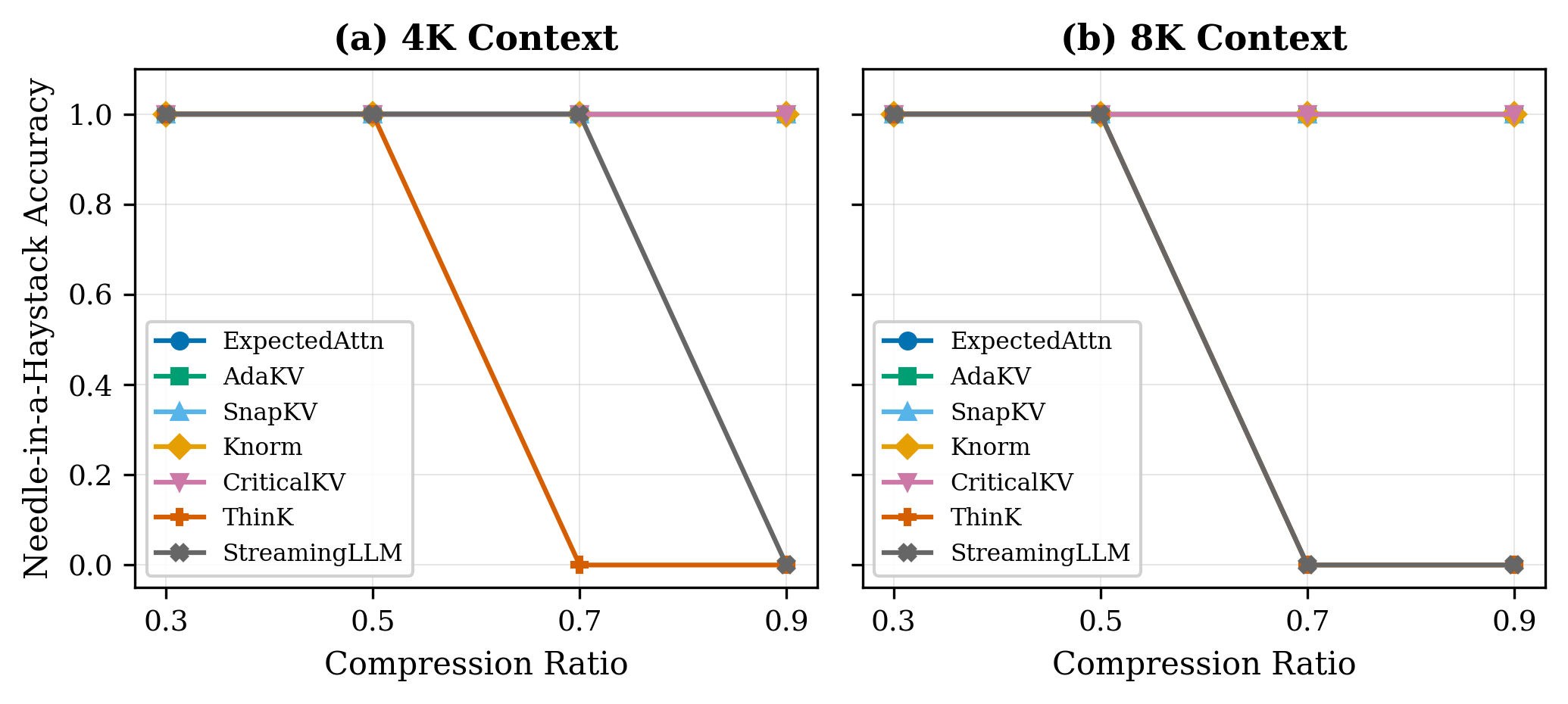
ThinKPress fails on retrieval tasks regardless of compression setting. It prunes along the channel dimension, removing entire feature dimensions rather than discarding tokens. Token-position-based eviction can preserve the needle regardless of where it sits which is difficult with channel pruning.
ThinKPress passes the compression ratio as key_channel_compression_ratio, which is interpreted as the fraction of channels to remove — the opposite of the token-eviction convention. A ratio of 0.7 means 70% of key channels are pruned, not 70% retained. The x-axis in fig1 reflects what was passed to the API, not a like-for-like comparison with the other five methods.
StreamingLLM’s failure is context-length dependent. At 4K it holds until aggressive compression; at 8K it starts failing well before that. The fixed sliding window keeps recent tokens and a few attention sinks from the start. Anything in the middle is gone. That’s fine for conversational generation but not for NIAH.
Similarly, StreamingLLM’s compression ratio controls how aggressively the middle of the context is evicted, not how much is retained. Higher values shrink the window, so the x-axis direction is again inverted relative to the token-eviction methods.
Memory usage
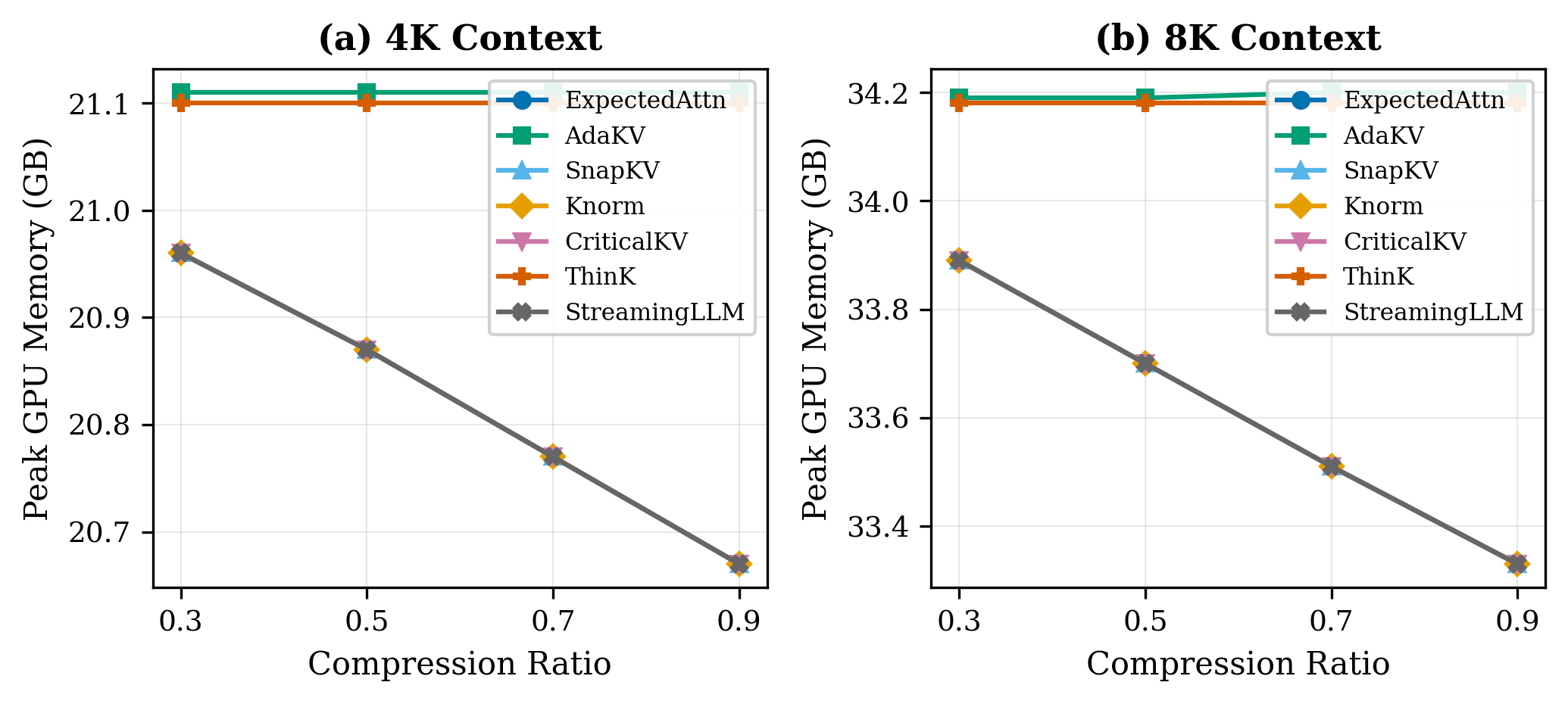
At 8K context, the difference between compression ratio 0.3 and 0.9 is less than 1 GB. Moving the slider from “keep 30% of the cache” to “keep 90%” barely registers.
Kvpress, like most hook-based compression libraries, operates post-prefill. The model runs a full forward pass over all input tokens, builds the complete uncompressed KV cache, and only then applies compression. Peak memory hits during prefill, before any compression code runs. The compression ratio controls how much memory the KV cache holds after prefill. It doesn’t touch the prefill peak.
At 8K, prefill already consumes around 34 GB out of 48 GB available. At 4K it’s 21 GB so context-dependent memory grows by roughly 13 GB per doubling of context length. At 16K and you’re past 48 GB, regardless of what compression ratio you’ve set, because the compression hasn’t happened yet when the peak arrives.
Latency overhead is manageable
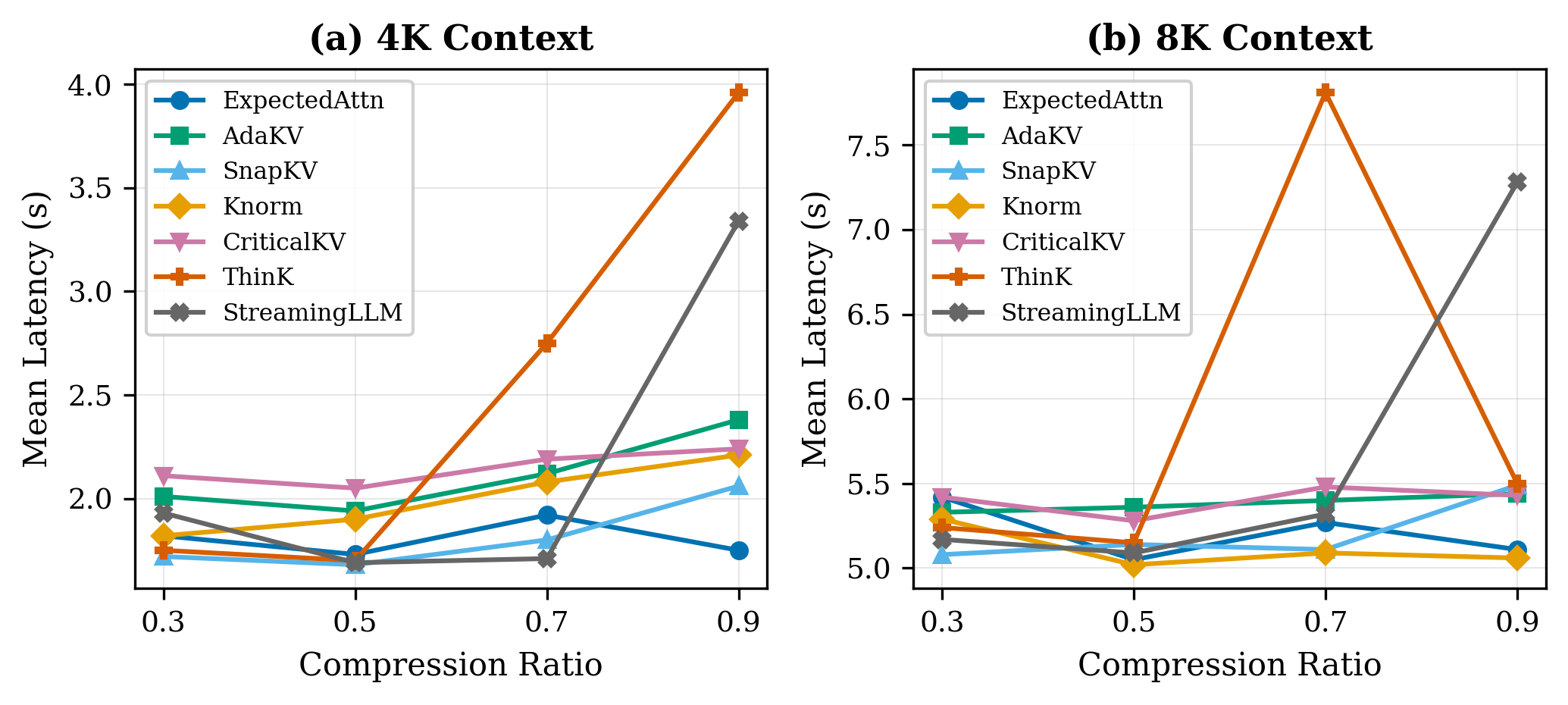
At 8K context, all five accurate methods e.g. ExpectedAttention, AdaKV, SnapKV, Knorm, and CriticalKV cluster around 5 seconds with no meaningful difference between them.
ThinKPress spikes to ~7.5s at a compression ratio of 0.7, and StreamingLLMPress spikes to ~6.5s at 0.9. These spikes coincide with the ratios where each method fails on retrieval as the model generates longer wrong answers, not more useful work.
For a deployment scenario where you’re already memory-constrained and want accuracy guarantees, any of the five accurate methods is a reasonable pick on latency grounds.
How to fix prefill memory issues
The most direct fix is chunked prefill with interleaved eviction: instead of running a full forward pass and compressing afterward, process the input in chunks and evict low-importance tokens between chunks so the complete KV cache never materializes at once. This reduces the peak directly rather than trimming the tail.
Other options worth looking into: CPU offloading (swap portions of the KV cache to system RAM during prefill), or quantization applied during prefill rather than after.
Recommendations
If you’re deploying on a single GPU with a context budget under 8K tokens, any of the five accurate methods are suitable. 70% compression works with no accuracy loss on retrieval tasks and the latency overhead is acceptable.
Know your context ceiling. On 48 GB with Llama 3.1 8B in bfloat16, hook-based compression doesn’t help past 8K. 16K requires a different approach entirely.
Don’t bother with ThinKPress or StreamingLLMPress for retrieval tasks. Channel pruning and sliding windows can’t preserve information from arbitrary positions in a long context.